
Understanding BigQuery Compute Pricing
Understand and manage the main component of BigQuery costs

Disclaimer: Costs and plans may have changed since this document's last update. Consult BigQuery documentation or contact us at hello@betterquery.ai for the most up-to-date information.
Google BigQuery is a powerful, serverless data warehouse that allows businesses to analyze massive datasets quickly and efficiently. Understanding its pricing model is crucial for optimizing costs and making informed decisions.
In this article we explore BigQuery's pricing structure, focusing on compute costs, which often constitute the largest portion of BigQuery expenses.
BigQuery costs can be divided into three main components:
Compute (or analysis) pricing. This is the most significant component, dominating pricing considerations. These costs come from scanning and processing data, as well as returning query results.
Storage pricing. This covers the cost of storing data in BigQuery.
Additional services. These involve transferring data in and out of BigQuery, running machine learning models, and utilizing the BI Engine service.
In this article, we'll focus on compute costs due to their complexity and substantial impact on overall expenses.
Compute costs summary
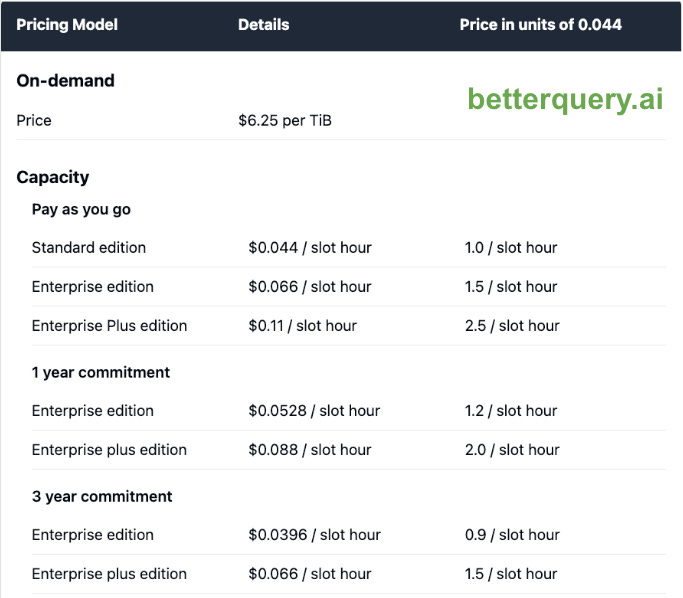
This table summarizes the current pricing for BigQuery compute. For Capacity pricing, the price is also expressed in units of $0.044 (equivalent to the price for pay as you go capacity, Standard edition) to facilitate comparison.
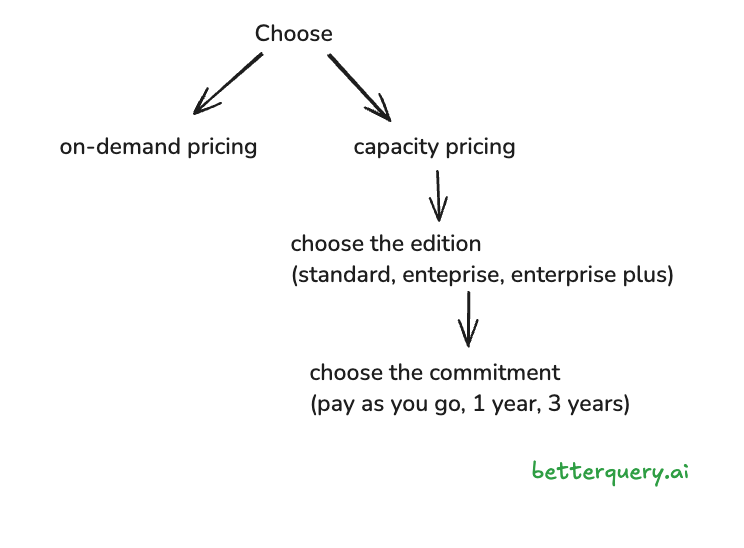
This chart summarizes the decisions you have to make to determine your compute pricing model.
On-demand pricing vs. capacity pricing
The first choice, and the most important one, is between on-demand pricing and capacity pricing. They work as follows:
On-demand pricing: You are charged for the amount of data processed by each query. For example, if a table is 1 GB, you will be charged for 1 GB every time BigQuery scans the table. You have a fixed query processing capacity (currently 2,000 slots) assigned to your project. You don’t manage the slots directly.
Capacity pricing: In this model, you purchase a fixed capacity that is shared across your projects. Capacity is measured in slots. You have to manage your slots to some extent.
Let us now see how slots work.
What are BigQuery slots?
The documentation provides the following definition:
A BigQuery slot is a virtual CPU used by BigQuery to execute SQL queries.
Essentially, the slot is a unit of computation. A useful analogy: slots are like workers in a physical warehouse. The more workers you have at a given time, the bigger your processing capacity. The heavier and more complex a query job, the more workers it will require. If you don’t have enough workers for your query, it will run slower or even fail to complete1.
With on-demand pricing, you don’t have direct control over slots. They are allocated automatically according to your query’s requirements.
With capacity pricing, you must explicitly choose how many slots to reserve. For example, you may settle on a baseline of 1,000 slots. Which means that at any point in time, your queries will have a maximum of 1,000 slots available for processing.
Deciding on the number of slots to reserve requires an estimate of your typical processing requirements. An imprecise estimate can be expensive:
If at any time you have more slots than your queries require, the slots will be idle and you will have overpaid.
If you have too few slots, your queries will be slower or fail to complete.
After choosing how many slots to reserve, you must find the best way to allocate them. Two important features help with that.
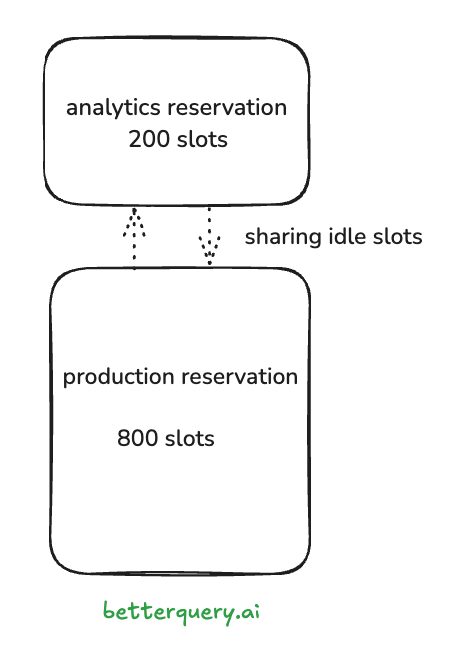
Slots can be partitioned with reservations. BigQuery allows you to organize your slots into reservations, so you can partition your resources. Many companies have production pipelines running in BigQuery alongside ad-hoc queries from analysts. Using reservations, you could allocate 80% of your slots to production work and reserve 20% for ad-hoc queries. This approach ensures that heavy analytical queries don't impact critical production workloads. In our warehouse analogy, this is equivalent to assigning workers to different departments. But what happens if one reservation is idle while the other needs more slots?
Slots can move between reservations. Fortunately, BigQuery can temporarily move idle slots across reservations to reduce slot under-utilization. Imagine you assigned 20% of your slots to analysts and 80% to production workloads. If your analyst is running a heavy query which has exhausted the analytics slots, while the production slots are idle, they will be enlisted (the official term is preempted) to help with the running query. These preempted slots will go back to production as soon as they are needed. This process is fully automatic and doesn’t require active management from the user2.
The Warehouse Analogy: On-demand vs. Capacity Pricing
Let’s expand on the warehouse analogy to better understand the difference between on-demand and capacity pricing in BigQuery.
As the warehouse manager, you have two options to pay your workers:
On-Demand Pricing (Pay-per-Package)
In this model, you pay the workers for every package that they move.
How it works: You're charged $1 for every package a worker processes.
Advantages: You only pay for actual work done. On slow days, your costs are low.
Disadvantages: During busy periods, costs can spike unpredictably. You might face higher per-package rates during peak times.
Capacity Pricing (Fixed Workforce)
Here, you pay a fixed amount to have a certain number of workers available at all times.
How it works: You pay $1,000 per day for 10 workers, regardless of how many packages they process.
Advantages: You have a guaranteed workforce and more predictable daily costs.
Disadvantages: If package volume is low, you're still paying for idle workers. If volume is too high, packages might pile up.
Comparison to BigQuery
On-Demand Pricing in BigQuery is like paying per package. You're charged for the amount of data processed in each query.
Capacity Pricing (Flat-Rate) in BigQuery is like paying for a fixed workforce. You purchase a certain amount of processing power (slots) for a flat rate.
Key Takeaways
On-Demand is great for unpredictable or sporadic workloads. You only pay for what you use, but costs can vary widely based on query volume and complexity.
Capacity is ideal for consistent, predictable workloads. Costs are more stable, but you risk paying for unused resources or facing performance issues if you underestimate your needs.
Just as you would choose your warehouse payment model based on your package processing patterns, you should choose your BigQuery pricing model based on your data processing patterns and predictability.
Should you choose on-demand or capacity pricing?
If you're just getting started with BigQuery, the basic on-demand pricing is typically the best choice. It requires no commitment, is easy to understand, and allows you to build knowledge of your usage patterns and needs.
Capacity planning works best when you have consistent, predictable workloads with occasional spikes. It's also more effective for high-volume querying because it provides a fixed cost for unlimited queries within your slot capacity. This model can lead to significant cost savings for organizations with steady, high-volume data processing needs.
It's important not to underestimate the impact of pricing models on analyst experience. With on-demand pricing, analysts must consider the cost of each query and may need to ration their requirements. This can sometimes lead to hesitation in running complex or large-scale queries, potentially limiting exploratory data analysis. Capacity planning, on the other hand, provides peace of mind, allowing analysts to run every necessary query without immediate cost concerns. The worst-case scenario is that a heavy query might consume many slots, potentially slowing down other queries.
It is also possible to combine the two pricing models by applying them to different projects. For example, you could have a project with fixed-capacity for your analysts to run ad-hoc queries, and another project with on-demand billing for production workloads. This hybrid approach allows you to optimize costs and performance for different types of workloads within your organization.
Capacity planning, however, requires accurate assessment of needs, planning, and budgeting. This process requires understanding the nuances of your organization's data processing patterns, future growth projections, and the technical aspects of BigQuery's capacity model.
Implementing capacity pricing introduces workload management as an additional consideration. This involves actively managing and deploying slots to optimize performance and cost-efficiency.
Editions
If you use capacity pricing, you have to choose between three BigQuery editions: Standard, Enterprise, Enterprise Plus. The table above shows the cost difference. The difference between the editions is described on this page. Here are noteable differences:
Maximum reservation size. Standard Edition forces a maximum of 1,600 slots per reservation. The upper tiers don’t have this limit.
Number of reservations. Standard Edition only allows 10 reservations, while the upper tiers allow 200.
Materialized views. Standard Edition only allows querying materialized views, but not creating or refreshing them.
Additionally, the advanced tiers offer compliance controls, VPC service controls, fine-grained security, data egress controls, custom encryption, query acceleration with BI engine, search indexes, BigQuery ML, cross-user caching, and newer features such as continuous queries.
Commitments
Enterprise and Enterprise Plus editions offer the possibility of purchasing slots for a longer period of 1 or 3 years.
If you can plan ahead, purchasing 1 or 3-year commitments can provide significant discounts, ranging from 20% to 40% off the base price, as illustrated in the table above.
Conclusion
Understanding BigQuery's pricing model is crucial for optimizing costs and maximizing value. By carefully considering your workload patterns and budget constraints, you can choose the most cost-effective combination of pricing model, edition, and commitment length.
While on-demand pricing offers flexibility, capacity pricing can provide cost predictability and potentially significant savings for consistent workloads. As your usage of BigQuery evolves, regularly reassess your pricing strategy to ensure it aligns with your changing needs.
Ultimately, the goal is to strike a balance between cost-efficiency and performance, enabling your organization to harness the full power of BigQuery without breaking the bank.
BetterQuery
At betterquery.ai, we're passionate about helping organizations make the most of BigQuery. Whether you're considering a switch to capacity pricing or looking to optimize your current setup, we're here to help. If you're navigating the complexities of BigQuery pricing and want a helping hand, feel free to reach out to us at hello@betterquery.ai.
References
BigQuery Reservations Introduction
Introduction to Workload Management
Contact BetterQuery for consultation
One way to optimize slot utilization is to effectively schedule your queries: spread out queries over time and don’t run heavy queries concurrently. This is a topic for another article.
This feature is called “idle capacity sharing” and is currently only available for Enterprise and Enterprise Plus editions.